PLAYER/STAGE INSTALLATION GUIDE ON UBUNTU 9.04, 10.04 LTS AND 12.04 LTS
Player-Stage or as it is now know,
Player Project is a very versatile software for robot simulation and hardware control interface. It primarily uses
FLTK and
OpenGL.
After trying various means and hopelessly failing, I successfully installed Player-Stage in Ubuntu 9.04 (and much later also on Ubuntu 10.04 - scroll down for that).
The following is a succinct of my efforts.
INSTALLING PLAYER/STAGE IN UBUNTU 9.04 AND UBUNTU 10.04 LTS
The post primarily deals with installation in Ubuntu 9.04, for installation in Ubuntu 10.04 LTS and 12.04 LTS scroll down, close to the end of this post.
THE INSTALLATION : IN 8 SIMPLE STEPS
#1.Update Ubuntu
A fresh installation of the OS (Ubuntu 9.04 ) is preferred.
Update Ubuntu 9.04 completely using sudo apt-get update and sudo apt-get upgrade. (Do not do a distribution update to Ubuntu 9.10 or higher)
#2.Install the dependencies
Dependencies for installation in Ubuntu 9.04;
sudo apt-get install autotools-dev build-essential cmake cpp libboost-signals1.35.0 libboost-signals1.35-dev libboost-thread1.35.0 libboost-thread1.35-dev libcv1 libcv-dev libgdk-pixbuf2 libgdk-pixbuf-dev libgnomecanvas2-0 libgnomecanvas2-dev libgsl0-dev libgtk2.0-dev libjpeg62-dev libtool libxmu-dev swig freeglut3 freeglut3-dev libfltk1.1 libfltk1.1-dev libltdl7 libltdl7-dev libpng12-0-dev libpng12-0
Make sure all these packages (or any alternative packages (hardly one or two) offered by Ubuntu 9.04 repositories, i.e. in case If libpng12-dev or any such package is not installed by apt-get, then install it manually) are installed. Run the above commands 2 to 3 times to confirm that these packages are indeed installed.
#3.Download the sources
#4.Configure and install player and stage in the $usr/local directory
Do not try to install Stage before installing Player. Stage installation script 'looks for' player installation
Installing Player
execute each of these commands (5 in total) one at a time in the same order as shown
cd player-3.0.0
mkdir build
cd build
cmake ../
make
sudo make install
Installing Stage
An Error in Stage files : Before installation, there is an error in Stage files that should be corrected, in the source code in the file Stage-3.2.0-Source/libstageplugin/p_driver.cc closer to the end of the file, Change the line : "world->Update();" to "Fl::wait();" . This error has been rectified in later versions of Stage (i.e. Stage-3.2.2 etc).
Now install, much like Player, execute each of these commands (4 in total) one at a time in the same order as shown.
cd Stage-3.2.0-Source
mkdir build
cd build
cmake ../
make
sudo make install
#5.Confirming the installation
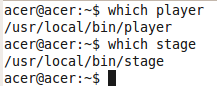 #6.Setting the 'PATH'
In the 'home' folder enable 'show hidden files' and locate the .bashrc file.
 At the end of the .bashrc file append the following.
PATH=$PATH:/usr/local/bin
LD_LIBRARY_PATH=$LD_LIBRARY_PATH:/usr/local/lib
PKG_CONFIG_PATH=$PKG_CONFIG_PATH:/usr/local/lib/pkgconfig
export PATH
export LD_LIBRARY_PATH
export PKG_CONFIG_PATH
Then run the command source ~/.bashrc from the terminal, restart the computer
 #7. Check !
In the Stage installation files
cd Stage-3.2.0-Source/worlds
Start the simulation with, player simple.cfg
If the following screen with a little red robot, pops up then everything is set up nicely !

#8. Check for compilation
In Player installation files, cd player-3.0.0/examples/libplayerc++
compilation command for sonarobstacleavoid.cc
g++ -o laserobstacleavoid `pkg-config --cflags playerc++` laserobstacleavoid.cc `pkg-config --libs playerc++`
If it compiles without any errors then all is good ! .....
SMORGASBORD FOR PLAYER-STAGE
(i) 2.5 Dimension
To see your robot do a 2.5 Dimension, press 'R' (Perspective Camera) while the 2 Dimensional simulation is on !
(ii) Command line check for version
Simple command lines, to confirm the versions of Player and Stage;
 (iii) robot-player from ubuntu repositories
In Ubuntu 10.04, one can install robot-player (sudo apt-get install robot-player) from the repositories and the package has been updated for recent versions of Ubuntu, however I faced C++ compilation issues with it.
(iv) Working with a virtual OS
If you are working in a virtual box virtual machine then there may be issues in controlling the robot hardware as hardware layer abstraction is not fully supported. However, simulation in stage is fine.
If you are working on Virtual Box then do Install Guest Additions (This will help to maximise the screen and seamlessly integrate the guest OS with host OS).
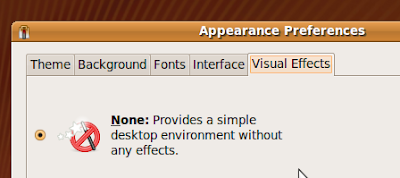
(v) 'flickering' in Stage
If Stage starts to flicker too much, then put the 'Visual Effects' in Ubuntu 9.04 to None.
(vi) Recording a video of the simulation
If required, the simulation may be recorded as a video using tools as Record MyDesktop, and then converting the ogg files to to to avi using MEncoder .
(vii) Mailing list and support
As Player-Stage newbie, one may consider joining the official mailing list and/or the facebook page.
(viii) Any other success story ?
This installation also works with Player-3.0.1 and Stage-3.2.0.
I recently tried an overwrite of the player with the latest svn, revision 8767 (3.1.0-svn) and that worked.
 However, do not try an overwrite of Stage.
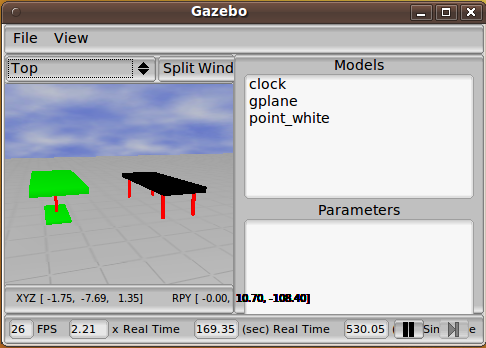
(ix) Gazebo installation
I have got a few enquiries about Gazebo ! .... and here is my response !
I could not install Gazebo, few attempts with version 0.10.0 conflicted with my Stage installation.
I installed ROS in order to work with Gazebo (version 0.9.0). ROS is a another Robotics suite and it uses Stage, Gazebo and a host of other softwares. However the working and command structure are much different from that of Player-Stage.
ROS is a way to use Gazebo without the hassles of
bindings etc. A word of advice, ROS recommends Ubuntu 9.10 for
installation. So this installation (recommended for Ubuntu 9.04) of
Player-Stage may not work in tandem with ROS.
In Ubuntu 10.04 LTS, ROS can be installed side by side with Player/Stage without any issues of conflict etc.
For more on ROS and Gazebo - see my article on using gazebo.
(x) New drivers
For the adventurous coders, who plans to design new player drivers - have a look at these tutorials,
(xi) New home for the project at github
The project has found a new home at github. Stage 4.0.0 was released on 26 November 2010.
It is worth noting that Stage 4.X.X has back compatibility issues with Stage 3.X.X. Have a look at, Moving from Stage 3 to Stage 4: laser and ranger .
(xii) Installation on Ubuntu 10.04 LTS
I was able to install Player-3.02 and Stage-3.2.2 on Ubuntu 10.04 LTS, I used the following tutorials;
#. Tutorial 1 - in German
#. Tutorial 2 - more suited to Ubuntu 10.10, but some tips well apply to Ubuntu 10.04
#. Tutorial 3

The major change from installation in 9.04 is the dependencies; rest of the installation is same as that for 9.04.
Dependencies for installation in Ubuntu 10.04;
sudo apt-get install autotools-dev build-essential cmake cpp libboost-python1.40.0 libboost-python1.40-dev libboost-thread-dev libboost-signals1.40.0 libboost-signals1.40-dev libcv4 libcv-dev libgdk-pixbuf2-ruby libhighgui-dev libgnomecanvas2-0 libgnomecanvas2-dev libgsl0ldbl libgsl0-dev libjpeg62-dev libtool libxmu-dev swig freeglut3 freeglut3-dev libfltk1.1 libfltk1.1-dev libgtk2.0-dev libltdl7 libltdl7-dev libpng12-0 libpng12-dev libcvaux4 libcvaux-dev libltdl-dev libguile-ltdl-1 fluid glutg3-dev freeglut3 freeglut3-dev libart-2.0-2 libatk1.0-0 libboost-thread1.40.0 libboost-thread1.40-dev libc6 libcairo2 libcv4 libcv-dev libcvaux4 libfontconfig1 libfreetype6 libgcc1 libgl1-mesa-glx libglib2.0-0 libglu1-mesa libglu1 libgnomecanvas2-0 libgsl0ldbl libgsl0-dev libgtk2.0-0 libhighgui4 libjpeg62 libjpeg62-dev liblodo0 libltdl7 libpango1.0-0 libplayerc++2 libplayerc2 libplayercore2 libplayerdrivers2 libplayererror2 libplayertcp2 libplayerxdr2 libpmap0 libstdc++6 zlib1g libxmu-dev
(xiii) A vmdk FOR PLAYER/STAGE AND ROS
I have recently made available a vmdk which has Player 3.0.2, Stage 3.2.2 and ROS (Electric) pre-installed.
http://mobotica.blogspot.in/2012/09/a-vmdk-for-ros-electric.html
(xiv) Installation on Ubuntu 12.04
Using Kevin's article I was able to install Player 3.0.2 and Stage 3.2.2 on Ubuntu 12.04 LTS (32 Bit).
Note for installation in Ubuntu 12.04
Kevin has mentioned that, for installation in Ubuntu 12.04 if Stage compilation gives the following error;
To correct this error you need to make the following changes in CMakeLists.txt where lines
SET (CMAKE_CXX_FLAGS_RELEASE " -O3 -DNDEBUG ${WALL} " CACHE INTERNAL "C Flags for release" FORCE)
SET (CMAKE_CXX_FLAGS_DEBUG " -ggdb ${WALL} " CACHE INTERNAL "C Flags for debug" FORCE)
SET (CMAKE_CXX_FLAGS_PROFILE " -O3 -ggdb -pg ${WALL} " CACHE INTERNAL "C Flags for profile" FORCE)
Needs to be changed to,
SET (CMAKE_CXX_FLAGS_RELEASE " -O3 -DNDEBUG -Wl,--no-as-needed" CACHE INTERNAL "C Flags for release" FORCE)
SET (CMAKE_CXX_FLAGS_DEBUG " -ggdb -Wl,--no-as-needed " CACHE INTERNAL "C Flags for debug" FORCE)
SET (CMAKE_CXX_FLAGS_PROFILE " -O3 -ggdb -pg -Wl,--no-as-needed " CACHE INTERNAL "C Flags for profile" FORCE)
REFERENCES AND INSTALLATION GUIDES FOR OTHER OS