Showing posts with label Player/Stage. Show all posts

Sunday, 6 October 2013

SIMULATIONS IN OLFACTORY, MANY ROBOTS

This blog post describes a player/stage simulation for multiple robot mapping with goals or reference points as odor sources. Let's think of a situation where we need to explore large environment and generate its map which can be used later on for navigation and localization. In this scenario, instead of single robot exploring such a large environment, its always beneficial and effective (in terms of processor usage and time) to allow multiple robots to explore different parts of the environment and merge the maps finally whether topologically or based on overlap regions in occupancy grid. 

This idea is based on Mobile Robot Olfactory experiments performed by ISR Embedded Systems Lab, details of which can be found here: (http://ftp.isr.ist.utl.pt/pub/roswiki/simulator_plumesim.html). 

The idea of using PlumeSim library for this purpose came from this interesting project of PlumeSim framework which simulates odor transport in the environment. The basis of this project is that olfaction is a key sense in the survival of many biological species. 

This article deals with the process of installing PlumeSim plugin driver initially followed by multiple robot mapping simulation in player/ stage. This driver is capable of introducing simulated chemical plumes into a simulated/ real robot from broad range of sources to CFD (computer fluid dynamics) software. Based on data collected from real world experiments, its also able to playback recorded plume in future periodically. 

Below are the steps involved in setting up the driver for this purpose:

1. The driver library can be downloaded at this link or at this github
    link: https://github.com/DevasenaInupakutika/PlumeSim-1.0

2. Clone to your local repository through terminal as below:
    
    git clone https://github.com/DevasenaInupakutika/PlumeSim-1.0

3. Enter the directory: 

     cd PlumeSim-1.0

4. Build the library using below command which will create the required driver
    (libPlumeSim.so):

    make

This plug-in driver in player/ stage brings plume simulation into the world of mobile robotics. This can be used as a great tool for developing odor search algorithms providing smooth path from simulated robot to real environment.

Sample output, the blue dots show the plume of the gas
In this article, we have taken use-case of this driver in multi-robot map merging. For this purpose, please follow below steps:

Note:  Make sure all the path corresponding to player/ stage packages and library are at same location.

1. The player/ stage package can be downloaded from here using below 
    command:


2. cd Player_Plumsim and Use make clean command to clean if package is  
    already built.

3. Built the package as below:
   
   g++ -o main`pkg-config --cflags playerc++` main.cc `pkg-config --libs  
   playerc++`

4. Run the program as below:

    player map_square.cfg

    Open another terminal (in a separate tab):
    
    ./main -p 6665 -r 1 

    (which means robot 1 will start moving where 1 is robot id    and 6665 is port 
    number)

The configuration file (map_square.cfg) contains description of robots and 
corresponding ports. The prime important thing so as make multiple robots to move is to assign either separate port numbers for each robot or use separate robot ids on same port number.

5. In order to run another robot, open another terminal tab and type below   
    command:

    ./main -p 6665 -r 2

   and so on. This has maximum of 12 robots.

After executing all the above steps, you get results similar to the ones shown in the below screen shots and corresponding robot text files (robot<id>.txt) files get updated based on which robot is traversing the environment and it's distance from odor source. The emanating gas is shown in red while the robots from top view are circles of various colours.


The files being updated contains simulation environment's map topological data (in terms of coordinates).

This work has also been implemented on ROS - occupancy grid map merging where in robots generate local maps by exploring separate areas of environment and merge based on overlap regions into a final global map which will be discussed in separate article.

This can be implemented on real robots as well using the player server of the player/stage suit.

Wednesday, 2 January 2013

PIONEER 3AT USING PLAYER

This post is about my experience with the P3-AT robot [2], so let`s see a video about it.


The robot P3-AT has a board computer with a Linux Debian 3 installed running a player`s server [1]. We were using a Control algorithm to do some experiments. The P3-AT is equipped with sonar, camera and compass.

REFERENCES 
[1] http://playerstage.sourceforge.net/ 
[2] http://www.mobilerobots.com/researchrobots/p3at.aspx

Sunday, 30 September 2012

A vmdk FOR ROS ELECTRIC

ROS INSTALLATION FOR THE NON-INITIATES


For a windows enthusiast, installing ROS is nothing short of a trauma. Install Ubuntu -- Update Ubuntu -- Install ROS -- Configure ROS, all of which over a bad connection can take more than 6-8 hours and getting acquainted with Ubuntu, bash and the ROS commands steepens the learning curve and thus the installation process.

I have been working with a virtual OS (vmdk) on Virtual Box 4.1, though this download is a 3 GB file, however once downloaded it comes pre-installed with ROS electric and Player/Stage on a Ubuntu 10.04 OS. Online installation and configuration is no more an issue. 


DETAILS OF THE vmdk FILE 

Download link; http://ubuntuone.com/1NHvytU3My6TakjeCFgqTi
Download and extract the vmdk file. 

OS details
OS : Ubuntu 10.04.4
login : electric
password : electric

ROS installation details
version : 1.6.9, electric emys
ROS_PACKAGE_PATH is set to ~/ros_packages

Player/Stage installation details
Player version : 3.0.2
Stage version : 3.2.2
The installation files can be found at ~/player-3.0.2 and ~/Stage-3.2.2-Source
  
ETCETERA
  1. After a full ROS installation, some basic packages have been downloaded and installed, can be found at ~/ros_packages  
  2. The installation of ROS and Player/Stage does not conflict. However while using Stage in ROS, it is advisable to use stageros than stage.
  3. C++ code to run Player/Stage can be found at ~/player-3.0.2/examples/libplayerc++ 
  4. world and cfg files for basic simulations in Stage can be found at ~/Stage-3.2.2-Source/worlds 
  5. gazebo is known to have issues when used on a virtual OS
  6. vmdk has been tried and tested in Virtual Box 4.1 on Ubuntu 12.04 host. Prospective users are welcome to try it out in VMWare
  7. Make sure to enable 3D acceleration in the Virtual OS
  8. Any issues - please email me at arkapravobhaumik at gmail dot com

Friday, 3 February 2012

DESIGNING STAGE CONTROLLERS

Stage 3.X.X onwards, it is a stand alone simulator and the robot behaviour can be controlled using 'controllers', the installation provides with some basic controllers which serves the purposes of wandering, laser noise, swarm formation etc. However such calls for the facility for writing custom made stage controllers.

Dr.Vaughan has provided a template for designing such controllers for stage 4.X.X, https://github.com/rtv/stagectrl; I have forked out a version of the same for stage 3.X.X; https://github.com/Arkapravo/stagectrl_stage3

The README file has instructions on how to use this template.
Fig.1. The default simulation for the template
   

Saturday, 28 January 2012

WALLE@ROS

WALLE@ROS

An interesting recreation in player/stage is walle, which was designed by Richard. I have made a ROS package of the same. The package can be downloaded here, http://mobotica.googlecode.com/files/walle_ros.tar.gz . The simulation may be run with the following command;

rosrun stage stageros `rospack find walle_ros`/world/simple.world 

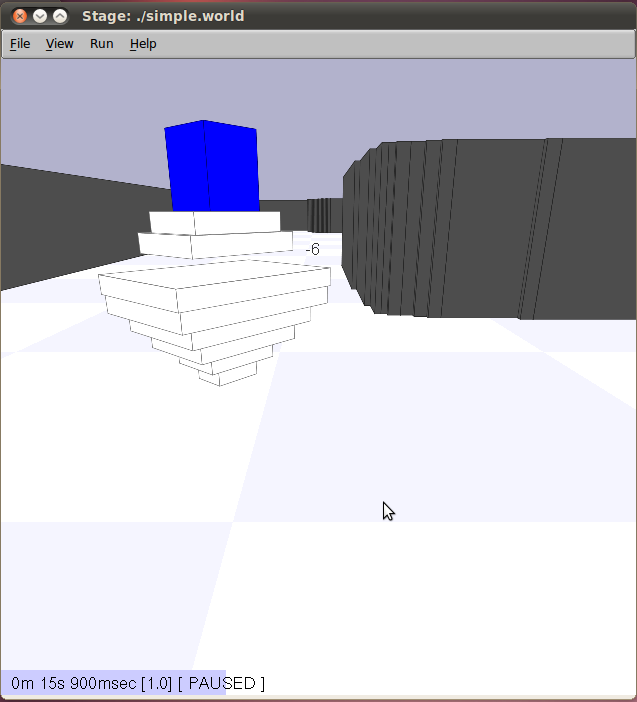
This stage window should pop-up,
 

The simulation script employs the stage wander controller, and the simulation starts off in the 'PAUSED' mode, left click on the stage window and press P to get things moving. Walle will wander around.

To have a closer look at walle, left click on the stage window and press R (Perspective camera). 
 

NOTE
  1. Tested on ROS diamondback, should work on ROS electric
  2. Any issues with the ROS package, please write to me at arkapravobhaumik at gmail dot com

Wednesday, 26 October 2011

VOLKSBOT

VOLKSBOT@PLAYER/STAGE

While browsing the web, I came across a very interesting model in player/stage, Volksbot. The sheer complication of the robot and its depiction in the stage model impressed me.


The model was designed for Stage 4.X.X, Brian was kind enough to send the model through to my email and I was able to modify it to suit Stage 3.X.X. 

CODES
  1. The codes for the simulation are available here

Monday, 26 September 2011

EVA

EVA@PLAYER/STAGE 

After some effort, I was able to put together an inc file in Player/Stage which resembled eva, walle's love interest.


Thursday, 8 September 2011

CAPTURE BY A SWARM

CAPTURE BY A SWARM


Flocking behaviour in Stage (3.2.2) can be realised by using 'pioneer_flocking' Stage controller. The default settings simulates 100 robots which exhibit swarm behaviour by forming flocks. 

A interesting feature of a swarm is that it can 'capture' other robots in its path. The captured robots behave as a part of the swarm. 

A DEMONSTRATION

1/3 - Initially there are 100 red robots and 3 yellow robots. On starting simulation the red robots start to move, triggered by sonars bouncing off the wall, while the yellow robots are stationary.


2/3 - The red swarm on reaching the yellow robots 'capture' them.


3/3 - The captured yellow robots behave as a part of the swarm.


CODES
Codes for the simulation are available here

REFERENCES

Saturday, 20 August 2011

THE KHEPERA

ORIGINS

The Khepera is a small mobile robot developed at the EPFL (École polytechnique fédérale de Lausanne) by Prof. Jean-Daniel Nicoud and his team. The Khepera has been developed and manufactured as a commercial product by the K-Team Corporation, for use in education and research. 

In Egyptian mythology, Khepera is the name of a beetle looking god, symbolizing the forces moving the sun. Khepera is more widely associated with “rebirth”, “resurrection”, “renewal”, and the general idea of “coming into being”: it might have inspired the looks and the name of the robot!
The main purpose of the Khepera is to provide a platform allowing training and experiments, involving local navigation, artificial intelligence, collective behavior, and real time programming.

It is widely acknowledge that the Khepera played a non negligible part in the emergence of evolutionary robotics.

ORIGINAL VERSION

The original Khepera is a 55mm diameter and 3cm high robot, constructed around a 16 MHz Motorola 68331 processor. Its motion and steering is achieved via 2 DC brushed servo motors with incremental encoders, and obstacles are detected thanks to 8 infrared proximity and ambient light sensors. The robot can be remotely operated, as the previous Kheperas, via a Personal Computer. 
Released 10 years ago, it has received a significant processor and firmware update before been discontinued. Let’s note that the sensors work pretty much like contact switches: the mobile robot could only detect very close obstacles.

K-2.0 VERSION

The Khepera II solved many shortcomings of the original, such as the reach of the distance sensors, swappable battery pack system for optimal autonomy, and a better differential drive odometry, allowing more precision on awkward surfaces. The khepera is now also capable of embarking additional modules increasing the versatility of the system. However, the most notable improvement is the added processing power improving the robot’s computing autonomy. 

K-3.0 VERSION

The third iteration of the Khepera is almost a revolution from the hardware point of view. On top of an array of 9 infrared sensors, two ground oriented sensors allowing line following and edge detection, the Khepera also embarks five ultrasonic sensors. 


An additional module allows Linux support, Flash extension cards, Wi-Fi, Bluetooth, 2D cameras, and extra storage space to complete the Khepera’s arsenal. The mobile robot also provides the user with improved quality motors and odometers to work with.

KHEPERA, PROGRAMMING AND CONTROL

Remote operation programs can be written with Matlab, LabView, or with any programming language supporting serial port communication. Here are the interesting ones; 

#.1. KiKS
KiKS means "KiKS is a Khepera Simulator", and runs under Matlab. It was developed by Theodor Storm as a Master’s degree year long project. KiKS emulates one or more Khepera robots connected to the computer by simulating motors, proximity/light sensor, and behaviours. 


 #.2. KHEPERA SIMULATOR
Khepera Simulator is a freeware package allowing to develop controllers for the mobile robot Khepera using C or C++ languages. It includes an environment editor and a graphical user interface. Moreover, if you own a Khepera robot, you will be able to switch very easily between the simulated robot and the real one. It is mainly directed at teaching and research in autonomous agents.


#.3. KHEPERA IN PLAYER/STAGE
Khepera can be simulated in Player/Stage;


#.4. KHEPERA IN WEBOTS
Khepera in Webots simulator;
 

Sunday, 14 August 2011

ROOMBA@PLAYER/STAGE

ROOMBA ROBOT

The roomba series of robots were designed by iRobot Corporation, primarily for vacuum cleaning and floor washing purposes. However, they are excellent and inexpensive tools to study robotics.


ROOMBA@PLAYERSTAGE

In Player/Stage installation files, one can find the irobot.inc file at; Stage-3.2.2-Source/worlds/irobot.inc

Making the irobot.inc file work with the sick laser one can get simple simulations.


ROOMBA@ROS

Roomba also has a  ROS package


ROOMBA@WEBOTS

Roomba icreate is  ready design in the the robot simulator webots. Though webots is not a free software, but it finds popularity in various universities. 


ROOMBA@GAZEBO 

For some samples of Roomba simulation in Gazebo simulator see my post, http://mobotica.blogspot.in/2012/01/teleoperation-in-gazebo.html

Tuesday, 2 August 2011

EMERGENT BEHAVIOUR - A DEMONSTRATION

EMERGENT BEHAVIOURS

Emergent behaviour; the system behaves in a novel way, unlike the way it was designed to do. Such behaviours have always been viewed with a sense of mysticism. 

Here are some opinions expressed by AI researchers and system technologists;
  • Emergence is “the appearance of novel properties in whole systems” (Moravec 1988)
  • “Global functionality emerges from the parallel interaction of local behaviors” (Steels 1990)
  • “Intelligence emerges from the interaction of the components of the system” (Brooks 1991)
  • “Emergent functionality arises by virtue of interaction between components not themselves designed with the particular function in mind” (McFarland & Bosser 1993)
  • They are a consequence underlying the complexity of the world in which the robotic agent resides and the additional complexity of perceiving that world” (Arkin 1998)
  • ....the arising of novel and coherent structures, patterns and properties during the process of self-organization in complex systems(Goldstein 1999)
  • .... where the agent appears to do something fairly complex, but is really just the result of interaction between simple modules” (Murphy 2000)
  • Behaviors serve as the basic building blocks for robotic actions, and the overall behavior of the robot is emergent” (Murphy 2000)
  • “Emergence is ubiquitous” (de Haan 2007)
Steels mentions two advantages of emergent behavior when compared to directly programmed behavior;
  • No additional structure is needed inside an agent to get additional capabilities. Therefore, we do not need any special explanations on how the behavior may come about.
  • Emergent behavior tends to be more robust because it is less dependent on accurate sensing or action and because it makes less environmental assumptions.
Goldstein points out to the generic characteristics of emergence;
  • Radical novelty (features not previously observed in the system)
  • Coherence or correlation (meaning integrated wholes that maintain themselves over some period of time
  • A global or macro “level” (i.e., there is some property of “wholeness”)
  • It is the product of a dynamical process (it evolves)
  • It is “ostensive” - it can be perceived. 
Brooks demonstrates how walking can emerge from a network of rather simple reflexes with little central control. Murphy provides an excellent insight into the topic in her book, 'Introduction to AI Robotics'.
 
..... away from the apparent magic, such behaviours are observed due to interaction of the system components.

OBSTACLE AVOIDANCE == WALL FOLLOWING  

In mobile robotics, a well known emergent behaviour is seen when the agent  may exhibit 'wall following', when it is programmed to 'obstacle avoidance'. 

Simple experiments in Player/Stage demonstrate this;


It is also seen that other behaviours as, 'wander' and 'random walk' fails to have a 'wall following' emergence of behaviour. 


 REFERENCE
(1) Brooks, R.A. "Intelligence without reason", Computers and Thought, IJCAI-91 ; also MIT AI Lab Memo 1293, April 1991.
(2) Steels, L. "The Artificial Life Roots of Artificial Intelligence", Artificial Life, Volume 1 Issue 1-2, Fall 1993/Winter 1994.
(3) An entertaining discussion on 'Ant Bridge' by Pedro Bittencourt 
(4) de Haan, J. "How emergence arises", Ecological Complexity 3 (2006) 293 – 301
(5) Goldstein, Jeffrey (1999), "Emergence as a Construct: History and Issues", Emergence: Complexity and Organization 1 (1): 49–72
(6) Youtube videos, 'Emergence - Complexity from Simplicity, Order from Chaos'; Part-1 & Part-2
(7) Brooks, R.A. "A Robot that Walks; Emergent Behaviors from a Carefully Evolved Network",  MIT AI Lab Memo 1091, February 1989
(8) Ackerman, E. "Swarmanoid Robot Teams Up with Itself to Steal Your Book" - article in IEEE Spectrum, Aug 2011
(9) Wikipedia page on Emergence
 

Sunday, 31 July 2011

BIG BOB

JENNY'S BIG BOB

One of the lovable robots you are likely meet while learning Player/Stage is Jenny's Big Bob. Jenny has written some excellent tutorials for the Player/Stage newbie. Lot more can be found at her blogspot.


Thursday, 19 August 2010

MAPS AFTER VACATION

MAPS AFTER VACATION

Back from vacation and time to pick were my work was left off ..

Using player log to create a map ..... never knew that player/stage comes with inbuilt utility pmap utility.

on running the command $pmaptest -g
"logname" -g non gui mode  

this produces a pretty neat map make sure pmaptest is built and linked and give a log file ... there are other options too 


I used writelog driver to generate the log

driver

(
name "writelog"
log_directory "/home/iis-tainee/Downloads/logs"
basename "mydata"
requires ["laser:0" "position2d:0"]
provides ["log:0"]
alwayson 1
autorecord 1
)

Saturday, 24 July 2010

WALL-E LOOKS FOR EVA

SPEECH IN PLAYER-STAGE 

We had met WALL-E@PLAYER-STAGE earlier this month. Now, WALL-E looks for EVA as he roams around.
Using the speech.cc file found in player installation files at player-3.0.0/examples/libplayerc++/speech.cc, modifying that file so slightly !

Using this script while WALL-E is set to 'wander' (Stage Controller) creates a fair animation, nicely combining the 2 behaviours; wandering and speech.


Lets hope WALL-E meets EVA soon ! :)

Monday, 5 July 2010

WALL-E

WALL-E@PLAYER-STAGE

While going through the stage installations files, I found a walle include file at Stage-3.2.0-Source/worlds/walle.inc.

Marrying walle.inc file with the 'usual'
simple.world, simple.cfg and sick.inc files I got wall-e to move around in the 'caves' environment !


Somehow this appealed to the child in me ! :) 


The following video is by talk2aswin;